Imagine this: you’re in the heat of a crucial gaming battle, your reflexes are sharp, and your aim is true. Suddenly, your mouse cord snags, pulling you out of the action and costing you the win. Frustrating, right? That’s where the magic of a wireless gaming mouse comes in. No more tangled cords or limited movement! But with so many brands and features out there, picking the perfect one can feel like another boss battle.
You want a mouse that’s fast, comfortable, and won’t let you down when you need it most. But how do you know which one is truly “pro-level” and which will leave you lagging? It’s easy to get lost in all the technical jargon and promises. This post is here to cut through the confusion and help you find a wireless gaming mouse that fits your hand, your budget, and your gaming style perfectly.
Get ready to learn about the key features that make a wireless gaming mouse great, what to look out for, and how to avoid common pitfalls. We’ll break down the tech in a way that makes sense, so you can make a smart choice. Let’s dive in and upgrade your gaming setup without the cord!
Our Top 5 Wireless Gaming Mouse Recommendations at a Glance
Top 5 Wireless Gaming Mouse Detailed Reviews
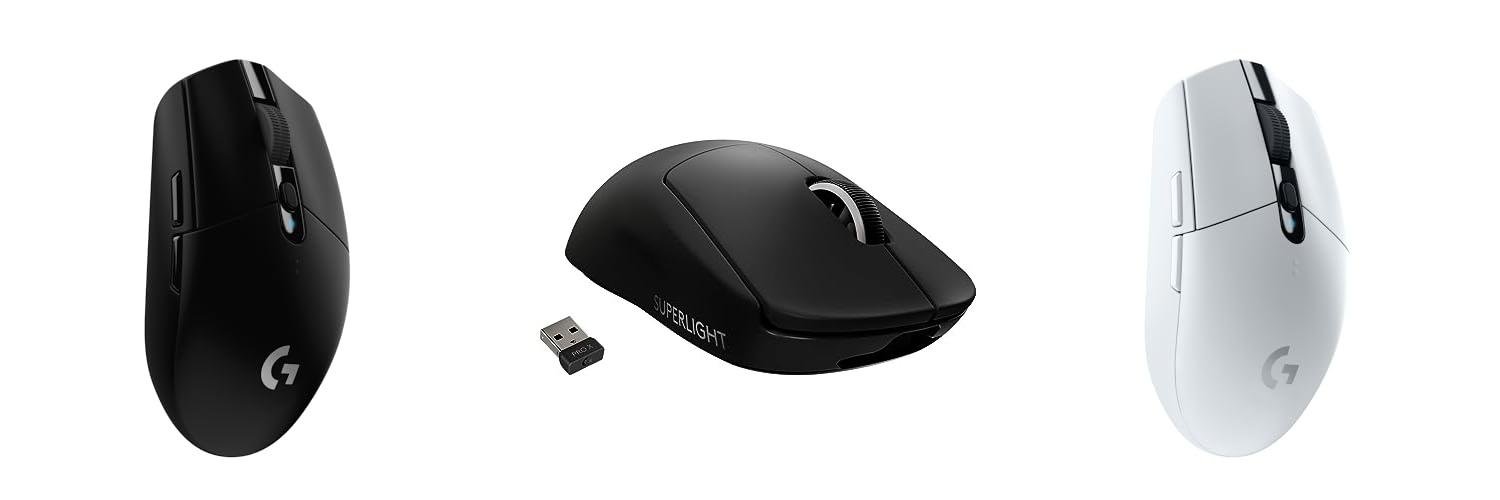
1. Logitech G305 LIGHTSPEED Wireless Gaming Mouse

Rating: 9.2/10
The Logitech G305 LIGHTSPEED Wireless Gaming Mouse is a fantastic choice for gamers who want freedom without sacrificing performance. Its lightweight design and lightning-fast wireless connection mean you can move freely and react quickly. The advanced HERO sensor provides pinpoint accuracy, and the long battery life keeps you in the game for hours on end.
What We Like:
- Ultra-fast LIGHTSPEED Wireless provides a lag-free gaming experience with a super-fast 1ms report rate.
- The HERO Gaming Sensor offers exceptional accuracy and responsiveness with up to 12,000 DPI sensitivity.
- Its lightweight design (only 99 grams) allows for high maneuverability during gameplay.
- The ultra-long battery life delivers 250 hours of continuous gameplay on a single AA battery.
- It features a compact, portable design with convenient built-in storage for the USB wireless receiver.
- Six programmable buttons let you customize your controls for any game.
What Could Be Improved:
- While lightweight, some users might prefer a slightly heavier mouse for a different feel.
- The need for AA batteries means you’ll need to keep spares on hand, unlike rechargeable mice.
This mouse offers incredible value for its performance. It’s a great option for serious gamers and casual players alike who want a reliable and responsive wireless gaming experience.
2. Logitech G PRO X SUPERLIGHT Wireless Gaming Mouse

Rating: 9.2/10
Get ready to level up your game with the Logitech G PRO X SUPERLIGHT Wireless Gaming Mouse. This mouse is built for winners, and esports pros helped design it. It’s super light, weighing less than 63 grams, so it feels like it disappears in your hand. This makes quick movements feel effortless. It uses Logitech’s fastest and most dependable wireless technology, called Lightspeed. You’ll also love the amazing accuracy thanks to the HERO 25K sensor. It gives you really precise control for all your gaming needs. Plus, the big, smooth feet on the bottom let the mouse glide across your mousepad without any drag. You can even program 5 buttons to do exactly what you want. It also has a battery that lasts a long time.
What We Like:
- Incredibly lightweight for fast, fluid movements.
- Top-notch accuracy and responsiveness with the HERO 25K sensor.
- Reliable and speedy wireless connection with Lightspeed technology.
- Large, smooth PTFE feet ensure a seamless glide.
- Long battery life keeps you in the game.
- Designed with input from professional gamers for peak performance.
What Could Be Improved:
- Limited to 5 programmable buttons.
- Available in black and white, but more color options would be nice.
This mouse is a fantastic choice for serious gamers who want the best performance. It’s engineered to help you win, offering speed, accuracy, and comfort.
3. Logitech G305 LIGHTSPEED Wireless Gaming Mouse

Rating: 9.4/10
Unleash your gaming potential with the Logitech G305 LIGHTSPEED Wireless Gaming Mouse. This sleek white mouse is built for speed and precision, letting you dominate your favorite games without the hassle of wires. Its lightweight design and advanced HERO sensor offer incredible accuracy, while the long-lasting battery keeps you in the game for hours on end.
What We Like:
- Super light, only 99 grams, making it easy to move quickly.
- Super fast wireless connection means no lag, so you can react instantly.
- The HERO sensor is very accurate, tracking every tiny movement perfectly.
- It can run for a super long time, up to 250 hours, on just one battery.
- It’s small and easy to carry around, with a place to store the USB receiver.
- You can program six buttons to do what you want.
- The price is really good for all the features you get.
What Could Be Improved:
- It only uses one AA battery, and some mice let you choose.
- The software for programming buttons could be a bit simpler for beginners.
- It doesn’t have RGB lighting, which some gamers like for looks.
The Logitech G305 is a fantastic choice for gamers who want wireless freedom without sacrificing performance. Its blend of speed, accuracy, and battery life makes it a winner.
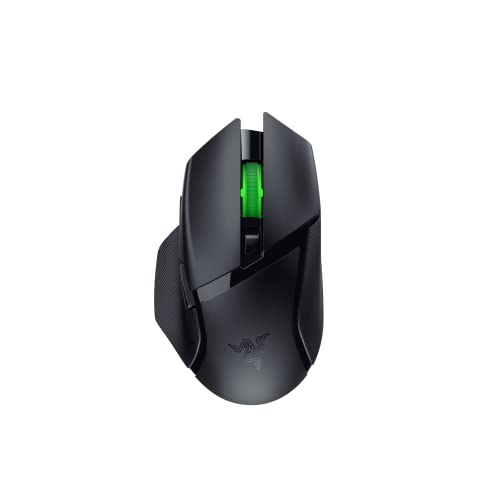
4. Razer Basilisk V3 X HyperSpeed Customizable Wireless Gaming Mouse: Mechanical Switches Gen-2-5G Advanced 18K Optical Sensor – Chroma RGB 9 Programmable Controls 535 Hr Battery Classic Black
Rating: 9.2/10
The Razer Basilisk V3 X HyperSpeed is a customizable wireless gaming mouse built for serious gamers. It offers amazing performance and comfort, making it a top choice for any gaming setup.
What We Like:
- The iconic ergonomic shape fits your hand perfectly for hours of comfortable gaming.
- You get 9 programmable buttons to set up all your favorite commands and shortcuts.
- Razer HyperSpeed Wireless provides super-fast, lag-free gaming, or switch to Bluetooth for longer battery life.
- Enjoy up to 535 hours of battery life on Bluetooth and 285 hours on HyperSpeed Wireless, so you can game longer.
- The Razer 5G Advanced 18K Optical Sensor offers precise tracking for accurate aiming.
- Razer Mechanical Mouse Switches Gen-2 give you crisp clicks that last up to 60 million clicks.
- Customize your mouse with Razer Chroma RGB lighting, choosing from millions of colors and cool effects.
- Razer is a leading brand for PC gaming peripherals in the U.S.
- You can optimize your mouse’s accuracy for better gameplay.
What Could Be Improved:
- While the battery life is great, specific usage conditions can affect actual playtime.
- Some users might find the default sensitivity settings need adjustment for their specific playstyle.
This mouse is a fantastic option for gamers seeking comfort, speed, and customization. Its long battery life and precise sensor make it a reliable companion for any gaming adventure.
5. Redragon M810 Pro Wireless Gaming Mouse

Rating: 9.1/10
The Redragon M810 Pro Wireless Gaming Mouse is a powerful tool for any gamer. It offers both wired and wireless options, a super high DPI for precise movements, and lots of buttons you can program. Plus, it has a long-lasting battery and cool RGB lights to make your gaming setup look awesome.
What We Like:
- Wireless freedom lets you move without any cords holding you back. This helps you react faster in games.
- You can adjust the DPI up to 10000. This means your mouse movements are super accurate, down to the smallest detail. You can even change the DPI levels using software.
- It has 8 programmable buttons. You can set them up for different actions in games or for your work. The rapid fire button and two side macro buttons make gaming and working easier.
- The mouse has a special sensor that uses less power. The battery lasts up to 45 hours, so you don’t have to charge it often.
- You can customize the RGB lights. You can create different lighting effects to match your mood or the game you’re playing. This adds a cool vibe to your room.
What Could Be Improved:
- While the 45-hour battery life is good, some gamers might want even longer playtime without needing to recharge.
- The software for customizing DPI and RGB lights can sometimes be a bit tricky for beginners to figure out.
This mouse offers a great balance of features and performance for its price. It’s a solid choice for gamers looking to improve their gameplay.
Level Up Your Game: The Essential Wireless Gaming Mouse Buying Guide
Are you tired of tangled wires holding you back during intense gaming sessions? A wireless gaming mouse can free you up and give you the edge you need. But with so many options, how do you pick the right one? This guide will help you find the perfect wireless mouse for your gaming setup.
1. Key Features to Look For
When choosing a wireless gaming mouse, several features make a big difference. These are the building blocks of a great gaming experience.
a. Sensor Performance (DPI & Polling Rate)
- **DPI (Dots Per Inch):** This tells you how sensitive the mouse is. A higher DPI means the cursor moves further on the screen with a small mouse movement. Gamers often prefer higher DPI for quick reactions.
- **Polling Rate:** This is how often the mouse tells your computer its position. A higher polling rate (like 1000Hz) means smoother movement and less delay. This is super important for fast-paced games.
b. Battery Life
No one wants their mouse dying mid-game. Look for a mouse with long battery life. Some can last for days or even weeks on a single charge.
c. Ergonomics and Grip
A comfortable mouse is key for long gaming marathons. Think about how you hold your mouse:
- Palm Grip: Your whole hand rests on the mouse.
- Claw Grip: Your palm rests on the back, but your fingers arch.
- Fingertip Grip: Only your fingertips touch the mouse.
Different mouse shapes suit different grips. Try to find one that fits your hand and grip style.
d. Wireless Technology
Most gaming mice use a USB dongle for a strong, lag-free connection. Some also offer Bluetooth, but this can sometimes have more delay. For gaming, a dedicated dongle is usually best.
e. Programmable Buttons
Extra buttons can be programmed with game commands. This lets you perform actions faster without taking your hand off the mouse.
2. Important Materials
The materials used in a gaming mouse affect its feel, durability, and grip.
- Plastic: Most mice use high-quality plastic. Look for textured surfaces that provide a good grip. Some have rubberized grips on the sides.
- Switches: The clicky buttons use switches. Brands like Omron are known for durable and responsive switches.
- Mouse Feet (Skates): These are usually made of PTFE (Teflon). They help the mouse glide smoothly across your mousepad.
3. Factors That Improve or Reduce Quality
Certain things make a wireless gaming mouse great, while others can make it frustrating.
a. What Makes a Mouse Great:
- Low Latency: This means almost no delay between your movement and what happens on screen.
- Accurate Tracking: The mouse sensor precisely follows your movements.
- Durable Build: The mouse feels solid and well-made.
- Comfortable Design: It fits your hand well for hours of play.
- Long Battery Life: You don’t have to charge it constantly.
b. What Can Make a Mouse Less Great:
- Laggy Connection: This is the biggest problem with wireless. A bad connection makes gaming impossible.
- Inaccurate Sensor: The cursor jumps around or doesn’t match your movements.
- Poor Battery Life: You’re always worried about it dying.
- Uncomfortable Shape: It causes hand fatigue or pain.
- Cheap Materials: The mouse feels flimsy or wears out quickly.
4. User Experience and Use Cases
A good wireless gaming mouse enhances your entire gaming experience. It’s not just for one type of game.
- First-Person Shooters (FPS): High DPI and polling rate are crucial for precise aiming and quick turns.
- Multiplayer Online Battle Arenas (MOBAs) & Real-Time Strategy (RTS): Programmable buttons can assign spells, abilities, or unit commands, giving you an advantage.
- MMORPGs: Many buttons are helpful for managing abilities and inventory.
- General Use: Even for everyday tasks, a comfortable and responsive wireless mouse is a pleasure to use.
Choosing the right wireless gaming mouse means balancing performance, comfort, and battery life. With this guide, you’re ready to make an informed decision and enjoy lag-free gaming!
Your Wireless Gaming Mouse Questions Answered
Q: What is DPI and why is it important for gaming?
A: DPI stands for Dots Per Inch. It measures how sensitive your mouse is. A higher DPI means the cursor moves further on your screen with a small movement of the mouse. For gaming, a higher DPI helps you make quick, precise movements to aim or react faster.
Q: How much battery life should I look for in a wireless gaming mouse?
A: It’s good to look for a mouse that lasts at least 30-50 hours on a single charge for regular gaming. Some can last much longer, which is even better so you don’t have to charge it often.
Q: What’s the difference between a gaming mouse and a regular mouse?
A: Gaming mice have better sensors for accuracy, higher polling rates for less delay, and often extra programmable buttons. They are also built to be more comfortable for long gaming sessions.
Q: Can wireless gaming mice have lag?
A: Some can, especially older models or those using Bluetooth. However, modern gaming mice with dedicated USB dongles offer very low latency, which means they are just as fast as wired mice.
Q: How do I know what grip style I have?
A: Look at how your hand rests on your current mouse. If your whole palm touches, it’s a palm grip. If your palm touches the back and your fingers arch, it’s a claw grip. If only your fingertips touch, it’s a fingertip grip.
Q: Are expensive wireless gaming mice always better?
A: Not always. While higher-end mice often have better features, you can find great value in mid-range options. It’s more important to find a mouse that fits your needs and budget.
Q: Do I need a special mousepad for a wireless gaming mouse?
A: While not strictly necessary, a good gaming mousepad can improve the tracking accuracy and glide of your mouse. They provide a consistent surface for the sensor.
Q: What does “programmable buttons” mean?
A: Programmable buttons are extra buttons on the mouse that you can set to perform specific actions in games. For example, you could assign a button to cast a spell or use an item.
Q: How do I connect a wireless gaming mouse?
A: Most gaming mice come with a small USB dongle. You plug this into your computer’s USB port, and the mouse usually connects automatically. Some might have a setup process through software.
Q: Can I use a wireless gaming mouse for work or school?
A: Absolutely! A comfortable and accurate wireless gaming mouse is also great for everyday tasks. The precision can make navigating documents and websites easier.
In conclusion, every product has unique features and benefits. We hope this review helps you decide if it meets your needs. An informed choice ensures the best experience.
If you have any questions or feedback, please share them in the comments. Your input helps everyone. Thank you for reading.

My name is Gary Flores, the creator of deepskyblue-owl-132507.hostingersite.com.. With a passion for creating cozy, functional, and beautiful spaces, I share my personal experiences and expertise about everything related to home improvement. From practical tips to design inspiration, my goal is to help you make your home the best it can be.