Imagine this: you’re in the middle of an intense game, your reflexes are sharp, and then… your mouse cord snags. Frustrating, right? That’s the freedom wireless gaming mice promise – no more tangled wires holding you back from victory. But with so many choices out there, picking the perfect one can feel like a quest in itself. How do you know which one is fast enough, comfortable enough, or has the right buttons for your favorite games?
It’s a common problem for gamers. You want that competitive edge, but the sheer number of wireless gaming mice can be overwhelming. Some are super light, others have fancy lights, and they all claim to be the “best.” It’s tough to sort through all the jargon and figure out what truly matters for *your* gaming style. You might end up with a mouse that feels wrong in your hand or doesn’t perform as well as you hoped.
But don’t worry! This guide is here to help you navigate the exciting world of wireless gaming mice. We’ll break down what makes a good wireless mouse, what features to look for, and how to find one that fits your budget and your grip. By the end, you’ll feel confident in choosing a mouse that will boost your gameplay and make every gaming session smoother. Let’s dive in and find your next ultimate gaming companion!
Our Top 5 Wireless Gaming Mouses Recommendations at a Glance
Top 5 Wireless Gaming Mouses Detailed Reviews
1. Logitech G305 Lightspeed Wireless Gaming Mouse

Rating: 9.2/10
The Logitech G305 Lightspeed Wireless Gaming Mouse is a fantastic choice for gamers looking for speed and accuracy without the hassle of wires. Its lightweight design and powerful HERO sensor make it a joy to use, whether you’re in intense battles or just browsing the web. The long battery life means you can game for hours on end.
What We Like:
- It’s super light! This makes it easy to move around quickly during games.
- The wireless connection is really fast and doesn’t lag, so your actions happen right away.
- The HERO sensor is very accurate and can be adjusted to your liking with up to 12,000 DPI.
- The battery lasts a really long time, up to 250 hours on one AA battery.
- It’s a great value for the performance it offers.
- You can store the wireless receiver inside the mouse, which is handy for travel.
What Could Be Improved:
- It only has 6 programmable buttons. Some gamers might want more.
- It runs on AA batteries, so you’ll need to replace them eventually instead of recharging.
- The scroll wheel click can be a bit stiff for some users.
For its price, the Logitech G305 offers incredible wireless performance and accuracy. It’s a solid pick for gamers who want a responsive and reliable mouse.
2. FFJ Wireless Gaming Mouse

Rating: 9.0/10
Get ready to level up your gaming with the FFJ Wireless Gaming Mouse. This mouse is packed with features to give you an edge, from its super-high DPI to its customizable RGB lights. It’s designed for comfort and built to last, making it a solid choice for any gamer.
What We Like:
- Super High DPI: With up to 24000 DPI, you can adjust your sensitivity for super-precise movements.
- Triple Connection Modes: Connect wirelessly with 2.4G or Bluetooth 5.3, or go wired with USB-C. Switch easily between devices!
- Highly Programmable: Six buttons can be customized with macros and other functions through the driver software. You can even tweak DPI and polling rates.
- Awesome RGB Lighting: Choose from six different RGB modes and customize colors, brightness, and speed to match your setup.
- Long Battery Life: Enjoy up to 75 hours of gaming on a single charge (or 40 hours with RGB on). It also charges quickly and can be used while plugged in.
- Comfortable Design: The ergonomic shape and skin-friendly material keep your hand comfortable, even during long gaming sessions.
- Durable Build: The micro switches are built to last up to 80 million clicks, so this mouse will be with you for many games to come.
What Could Be Improved:
- Software Might Be Complex for Beginners: While powerful, the driver software might take some time to get used to for users new to advanced mouse customization.
This FFJ gaming mouse offers a fantastic combination of performance, customization, and battery life. It’s a powerful tool that can help you dominate in your favorite games.
3. LuLabboard Wireless Gaming Mouse
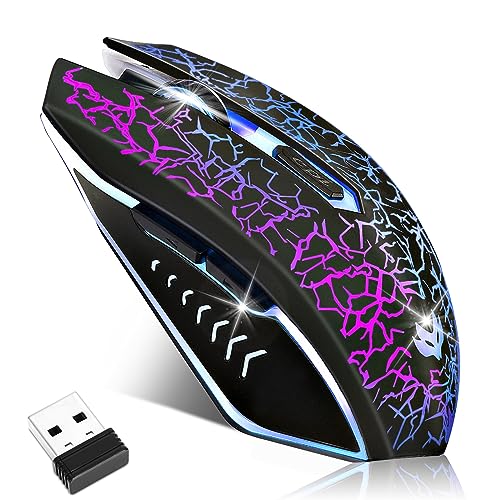
Rating: 8.5/10
The LuLabboard Wireless Gaming Mouse is a versatile and feature-rich option for anyone looking for a new computer mouse. It offers a blend of performance, comfort, and style, making it suitable for gaming, work, and everyday use on your laptop, PC, or Mac.
What We Like:
- Enjoy a smooth and reliable connection with 2.4G wireless technology, offering a good range and no annoying delays.
- You can easily adjust the cursor speed with 3 DPI settings (up to 2400 DPI) to match your needs, whether you’re gaming or browsing.
- The ergonomic design feels comfortable in your hand, reducing strain during long sessions, and the silent click buttons mean you won’t disturb others.
- Add a cool vibe to your setup with the vibrant 7-color LED lighting, which can also be turned off when you prefer.
- This mouse works with most operating systems and devices, making it super compatible.
- The rechargeable battery lasts a long time, and you can even use it while it’s charging.
- It’s built to last, with a tested click lifespan of up to 5 million clicks.
- The company offers a generous 18-month after-sale service, which is great peace of mind.
What Could Be Improved:
- While the 2.4G connection is stable, some advanced users might prefer a Bluetooth option for more versatility.
- The mouse is described as “ergonomic,” but individual hand shapes vary, so it might not be a perfect fit for everyone.
This LuLabboard mouse is a solid choice for its wireless freedom, comfortable design, and cool lighting. It’s a great gift idea, especially with the reliable customer service.
4. Razer Basilisk V3 X HyperSpeed Customizable Wireless Gaming Mouse: Mechanical Switches Gen-2-5G Advanced 18K Optical Sensor – Chroma RGB 9 Programmable Controls 535 Hr Battery Classic Black

Rating: 9.3/10
The Razer Basilisk V3 X HyperSpeed is a customizable wireless gaming mouse that offers top-notch performance for gamers. It features a comfortable ergonomic design, advanced optical sensor, and long-lasting battery life, making it a great choice for extended gaming sessions. Its vibrant Chroma RGB lighting adds a personalized touch to your setup.
What We Like:
- The iconic ergonomic shape feels great in your hand and works with different grip styles.
- You get two wireless options: Razer HyperSpeed Wireless for super-fast gaming and Bluetooth for longer battery life.
- The battery lasts a really long time – up to 535 hours on Bluetooth and 285 hours on HyperSpeed Wireless.
- The Razer 5G Advanced 18K Optical Sensor provides super accurate tracking, so your aim is always on point.
- Razer Mechanical Mouse Switches Gen-2 give you a satisfying click and last for millions of clicks.
- Razer Chroma RGB lets you choose from millions of colors and cool lighting effects.
- It’s from Razer, the top PC gaming peripherals brand in the U.S.
- You can program 9 buttons for your favorite commands and macros.
What Could Be Improved:
- While the battery life is impressive, it can vary depending on how you use the mouse.
- Some users might prefer even more programmable buttons for complex game setups.
This mouse is a solid choice for gamers who want comfort, performance, and customization all in one package. It’s built to last and designed to help you win.
5. Logitech G502 Lightspeed Wireless Gaming Mouse with Hero 25K Sensor

Rating: 8.6/10
The Logitech G502 Lightspeed Wireless Gaming Mouse is a top-tier choice for gamers who demand speed and precision. Its wireless design means no tangled cords, and the HERO 25K sensor delivers amazing accuracy. You can even customize it with different weights and RGB lighting to match your setup.
What We Like:
- It uses ultra-fast wireless tech that pro gamers trust.
- The HERO 25K sensor offers incredible 1:1 tracking for perfect aim.
- You can customize the mouse with 11 buttons and a hyper-fast scroll wheel.
- It’s compatible with PowerPlay wireless charging, so you never run out of battery.
- The tunable weights let you find your perfect feel.
- Lightsync RGB lighting adds a cool, personalized touch to your desk.
What Could Be Improved:
- The PowerPlay wireless charging system is sold separately, adding to the cost.
- Some users might find the initial setup with Logitech G Hub a bit complex.
This mouse offers a premium gaming experience with its advanced features and customization options. It’s a fantastic investment for serious gamers looking to elevate their gameplay.
Finding Your Perfect Wireless Gaming Mouse
Gamers, listen up! A good wireless gaming mouse can make a huge difference in your gameplay. It lets you move freely without getting tangled. But with so many options, how do you pick the best one? This guide will help you find the perfect mouse for your needs.
1. Key Features to Look For
These are the most important things to consider when buying a wireless gaming mouse:
- Sensor Type and DPI: This tells you how sensitive your mouse is. Higher DPI means the cursor moves further on your screen with less mouse movement. Look for a mouse with a good optical sensor.
- Polling Rate: This is how often the mouse tells your computer its position. A higher polling rate (like 1000Hz) means smoother, more responsive movement.
- Connectivity: Most wireless mice use a USB dongle. Some also offer Bluetooth. A dongle usually provides a more stable connection for gaming.
- Battery Life: You don’t want your mouse dying mid-game! Check how long the battery lasts on a single charge. Some mice can be used while charging.
- Ergonomics and Grip: How the mouse feels in your hand is super important. It should be comfortable for long gaming sessions.
- Extra Buttons: Many gaming mice have programmable buttons. You can assign different actions to them, which is great for complex games.
2. Important Materials
The materials used affect how the mouse feels and how long it lasts.
- Plastic: Most mice use plastic. High-quality plastic feels sturdy and has a nice texture. Some have a matte finish to prevent slipping.
- Rubber Grips: These are often on the sides of the mouse. They give you a better hold, especially when your hands get sweaty.
- Mouse Feet (Skates): These are usually made of PTFE (Teflon). Smooth skates help the mouse glide easily across your mousepad.
3. Factors That Improve or Reduce Quality
Certain things make a wireless gaming mouse better or worse.
- Sensor Quality: A top-notch sensor tracks your movements accurately. Cheap sensors can be jumpy or lose tracking.
- Build Quality: A well-built mouse feels solid and doesn’t creak when you use it. Loose buttons or wobbly parts mean lower quality.
- Wireless Interference: Sometimes, other wireless devices can mess with your mouse’s signal. A good mouse has technology to minimize this.
- Lag: The best wireless mice have almost no lag. This means there’s no delay between your movement and what happens on screen. Some older or cheaper wireless mice might have noticeable lag.
- Software: Good gaming mice come with software that lets you customize DPI, button assignments, and lighting. Easy-to-use software is a big plus.
4. User Experience and Use Cases
How you use your mouse matters.
- Comfort: For long gaming sessions, comfort is key. A mouse that fits your hand shape well prevents fatigue.
- Gaming Style: Fast-paced games like shooters need a responsive mouse with a high DPI. Strategy games might benefit from extra programmable buttons.
- Portability: If you travel with your gaming setup, a smaller, lighter mouse with a good battery life is useful.
- Desk Setup: A wireless mouse gives you more freedom to arrange your desk how you like it. No more cord clutter!
Choosing a wireless gaming mouse is an investment in your gaming experience. By looking at these features, materials, and factors, you can find a mouse that makes every click and swipe count!
Frequently Asked Questions (FAQ)
Q: What is DPI and why is it important for gaming?
A: DPI stands for Dots Per Inch. It measures how sensitive your mouse is. A higher DPI means your cursor moves further on the screen with less physical movement of the mouse. For gaming, higher DPI can help you react faster in fast-paced games.
Q: How much battery life should I look for in a wireless gaming mouse?
A: Most good wireless gaming mice offer at least 20-30 hours of battery life. Some can last for weeks on a single charge. It’s good to check reviews for real-world battery performance.
Q: Can wireless gaming mice have lag?
A: Older or cheaper wireless mice could have lag. However, modern wireless gaming mice use advanced technology to provide a connection that is just as fast as wired mice, with no noticeable lag for most gamers.
Q: What’s the difference between a USB dongle and Bluetooth for gaming?
A: A USB dongle usually creates a dedicated, low-latency connection that is best for gaming. Bluetooth is more common and uses less power but can sometimes have more lag, making it less ideal for competitive gaming.
Q: Do I need special software for a wireless gaming mouse?
A: While you can use a wireless gaming mouse without software, it’s highly recommended. The software lets you customize settings like DPI, button assignments, and RGB lighting to fit your playstyle.
Q: How do I clean my wireless gaming mouse?
A: You can gently wipe the mouse with a slightly damp, lint-free cloth. For tough spots, use a little mild soap. Make sure the mouse is unplugged and dry before using it again.
Q: What is a polling rate and why does it matter?
A: The polling rate is how often your mouse sends information to your computer. A higher polling rate (like 1000Hz) means your mouse movements are registered more often, leading to smoother and more responsive gameplay.
Q: Are there wireless gaming mice that are good for both right-handed and left-handed people?
A: Yes, some ambidextrous mice are designed to be comfortable for both right and left-handed users. They often have a symmetrical shape.
Q: How do I know if a mouse will fit my hand?
A: Mouse size and shape are personal. Look at the dimensions of the mouse and compare them to mice you’ve used before. Reading reviews that discuss hand size and grip style can also help.
Q: Is it okay to use a wireless gaming mouse while it’s charging?
A: Many wireless gaming mice can be used while they are charging via a USB cable. This is a great feature so you don’t have to stop gaming if the battery gets low.
In conclusion, every product has unique features and benefits. We hope this review helps you decide if it meets your needs. An informed choice ensures the best experience.
If you have any questions or feedback, please share them in the comments. Your input helps everyone. Thank you for reading.

My name is Gary Flores, the creator of deepskyblue-owl-132507.hostingersite.com.. With a passion for creating cozy, functional, and beautiful spaces, I share my personal experiences and expertise about everything related to home improvement. From practical tips to design inspiration, my goal is to help you make your home the best it can be.