Imagine your grandparent, living independently, but you worry about them falling or needing help when you’re not around. This is a common worry for many families. As our loved ones get older, we want them to stay safe and comfortable in their own homes. But how can we be sure they’re okay, especially when we can’t be there all the time?
Choosing an elderly monitoring system can feel overwhelming. There are so many different types, with fancy names and features that can be confusing. You want the best for your family, but it’s hard to know where to start or what will truly work. This post is here to help you cut through the confusion.
By reading on, you’ll learn about the different kinds of monitoring systems available, what to look for, and how to pick the one that fits your family’s needs best. We’ll break down the important features and help you understand how these systems can give you peace of mind. Let’s explore how technology can help keep your elderly loved ones safe and sound.
Our Top 5 Elderly Monitoring System Recommendations at a Glance
Top 5 Elderly Monitoring System Detailed Reviews
1. CallToU Elderly Monitor with Camera and Audio
Rating: 9.4/10
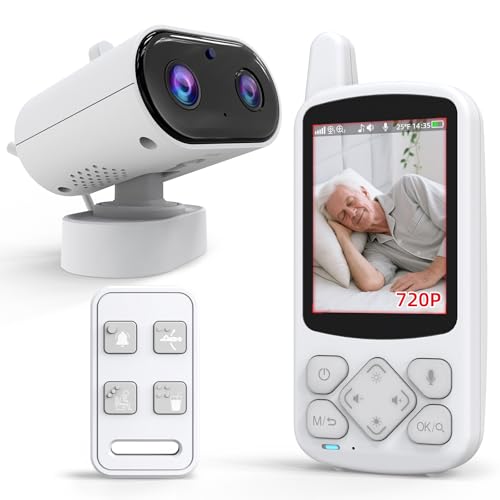
The CallToU Elderly Monitor with Camera and Audio is a smart way to keep an eye on your loved ones. It’s designed for seniors, including those with dementia. This system offers clear video and audio, plus an SOS button for emergencies. It works without Wi-Fi, so it’s super private and easy to set up.
What We Like:
- No Wi-Fi Needed: This system uses a secure signal that doesn’t need the internet. That means your connection is private and safe. It’s a truly reliable monitor for families who want security and simplicity.
- Clear Night Vision: You can see and talk to your loved one in real-time. The camera has infrared night vision, so you can see clearly even in the dark. It’s a great room monitor for elderly people.
- SOS Button & Daily Alerts: It has a simple SOS button for quick help. It also reminds seniors to drink water, move, and use the toilet. These are very helpful gadgets for daily care.
- Portable and Flexible: The receiver is small and fits in your pocket. The cameras have a wide view and can be placed in any room. This makes it a flexible monitoring system.
- All-in-One Care: This product includes a temperature sensor for room alerts. You can also zoom in with 4x zoom on its 720P screen for close-up checks. It’s a complete elderly care tool.
What Could Be Improved:
- The screen size is 2.8 inches, which might be small for some users who prefer a larger display for viewing.
- While it’s designed for ease of use, some elderly individuals might still need help with initial setup or understanding all the features.
The CallToU Elderly Monitor offers peace of mind with its secure, easy-to-use features. It’s a practical choice for ensuring the safety and well-being of seniors.
2. PILSAMAS WiFi Caregiver Pager Smart Call System – Display Caller ID & App Alerts

Rating: 8.6/10
The PILSAMAS WiFi Caregiver Pager Smart Call System offers peace of mind for seniors and their caregivers. This system helps ensure help is just a button press away, with smart features that keep everyone informed.
What We Like:
- Smart Hub & Wide Range: The hub connects to your Wi-Fi, letting you get alerts on your phone no matter where you are. The buttons work up to 328 feet away, even through walls.
- Instant Identification: When a button is pressed, the hub shows which button was used with flashing lights and a sound. The app also tells you who and where needs help right away.
- Free App Control: You can customize alert sounds and volumes, name the buttons, and share alerts with family. The app is free to use forever.
- Waterproof Design: The wristband and call buttons are waterproof (IP65 rated). They can handle splashes and even direct water spray, making them safe for use in showers or by sinks. This helps prevent falls in wet areas.
- Ready to Use & Versatile: The system comes pre-paired and is easy to set up. The wristband is comfortable and adjustable. The extra call buttons can be worn around the neck, mounted on a wall, or placed on a table.
What Could Be Improved:
- The Wi-Fi hub only works with 2.4G Wi-Fi, not 5G.
- SMS, call, and email alerts require an extra plan.
This system provides reliable and convenient communication for caregiving needs. It’s a great tool for ensuring safety and quick response.
3. CallToU Caregiver Pager Wireless Call Button Nurse Alert System 500+ Feet for Home/Elderly/Patient/Disabled 1 Plugin Receiver 1 Waterproof Transmitter

Rating: 9.2/10
The CallToU Caregiver Pager Wireless Call Button Nurse Alert System offers a reliable and convenient way to ensure help is always within reach. This system is designed for peace of mind, allowing caregivers and those needing assistance to maintain independence while staying connected. It’s especially useful for elderly individuals, patients, or people with disabilities in a home setting.
What We Like:
- It provides a wireless guard, meaning caregivers and residents can move freely while still being able to call for help easily.
- The system is easy to carry. The receiver can be moved around the house, and the call button can be worn as a pendant or mounted with a bracket or sticker.
- It offers smart ringtones with 55 choices and adjustable volume levels, so you can pick a sound that works best.
- Both the call button and receiver are waterproof and dustproof, making them suitable for use in bathrooms or outdoors.
- The product comes in nice packaging, and there’s a user manual and customer service available if you have questions.
What Could Be Improved:
- The receiver needs to be plugged into an electrical outlet, which limits its placement to areas near a power source.
- While the range is good, it’s for open areas, and obstacles might reduce the signal strength.
This CallToU Caregiver Pager is a solid choice for anyone seeking a dependable alert system. It offers a good balance of features and ease of use for everyday situations.
4. CallToU Wireless Caregiver Pager Smart Call System 2 SOS Call Buttons/Transmitters 2 Receivers Nurse Calling Alert Patient Help System for Home/Personal Attention Pager 500+Feet Plugin Receiver

Rating: 9.3/10
The CallToU Wireless Caregiver Pager Smart Call System offers peace of mind for both caregivers and those needing assistance. This system includes two call buttons and two receivers, making it easy to stay connected within a home environment.
What We Like:
- It provides a strong sense of security, allowing users freedom while ensuring help is always within reach thanks to the two SOS call buttons.
- The system is designed for ease of use and portability. The receiver can be moved around the house within a 500+ ft range, and the call button can be worn as a pendant or attached with a bracket.
- You can choose from 55 different ringtones and adjust the volume to five levels, so you won’t miss an alert.
- Both the call buttons and receivers are waterproof and dustproof, making them suitable for use anywhere, even in the bathroom or outdoors.
- The product comes in attractive packaging, and the company offers a user manual, 24-hour customer service, and a professional technology team to help with any questions.
What Could Be Improved:
- The receivers need to be plugged into an electrical outlet, which limits placement options if there aren’t outlets readily available in certain areas.
This caregiver pager system is a reliable and user-friendly solution for home care. It effectively bridges the communication gap, ensuring safety and independence for everyone involved.
5. JEMXITG Elderly Monitor with Camera and Audio
Rating: 9.5/10
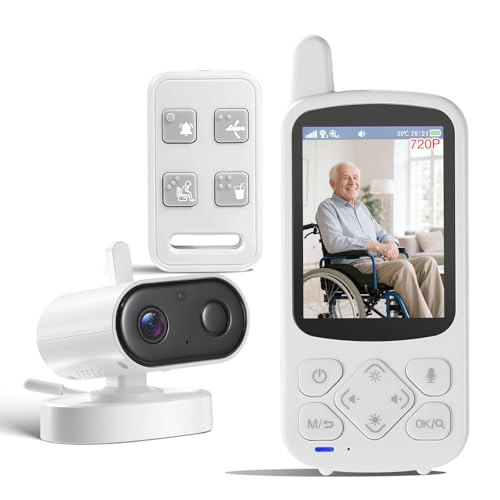
The JEMXITG Elderly Monitor with Camera and Audio is an all-in-one solution designed to provide peace of mind for caregivers and seniors. It offers robust features to keep your loved ones safe and connected, all without needing Wi-Fi for enhanced privacy.
What We Like:
- It’s an all-in-one senior care monitor with 2-way audio, an SOS button, and medication reminders.
- The smart VOX feature saves power by waking the screen only when it hears a sound.
- Dedicated buttons on the remote make it easy to call for help, even for those with vision difficulties.
- Medication reminders and temperature monitoring help prevent health issues.
- The camera automatically switches to night vision so you can see clearly in the dark.
- It has a wide viewing angle with 355° pan and 90° tilt, plus 4X zoom.
- No Wi-Fi needed means your privacy is protected from hackers.
- The 2000mAh battery lasts up to 15 hours, so you don’t have to charge it every day.
- The package includes everything you need to get started: camera, screen, remote, cables, and instructions.
What Could Be Improved:
- The 5-inch screen might be a bit small for some users who prefer a larger display.
- While the remote has raised markers, some users might still find it challenging to navigate quickly.
This JEMXITG monitor offers comprehensive features for senior care, making it a valuable tool for caregivers seeking reliable and private monitoring.
Choosing the Right Elderly Monitoring System: Your Comprehensive Guide
Keeping loved ones safe and independent is a top priority. Elderly monitoring systems offer peace of mind by providing a way to check in and get help when needed. This guide will help you understand what to look for when choosing the best system for your family.
1. Key Features to Look For
When you’re shopping for an elderly monitoring system, several important features can make a big difference. Think about what your loved one needs most.
Personal Help Buttons
- Easy to Wear: These are usually small buttons that can be worn as a pendant or wristband. They should be comfortable and waterproof so they can be worn in the shower.
- Simple Activation: Pressing the button should immediately connect to a monitoring center or designated contacts.
Fall Detection
- Automatic Alerts: Some systems have sensors that can automatically detect a fall. This is crucial because a person might not be able to reach their help button after a fall.
- Accuracy: Look for systems with proven accuracy to avoid false alarms.
Home Sensors
- Activity Monitoring: These sensors track movement in the home. They can alert you if there’s no activity for a long time, which might signal a problem.
- Door/Window Sensors: These let you know if doors or windows are opened, which can be helpful for individuals who wander.
- Smart Home Integration: Some advanced systems can connect with other smart home devices.
Communication Features
- Two-Way Voice: The ability to speak directly with a monitoring center or family member through the device is a vital feature.
- Mobile App: A good mobile app allows caregivers to check status, receive alerts, and communicate easily.
2. Important Materials and Design
The materials and design of an elderly monitoring system impact its durability and ease of use.
- Durable Plastics: Most devices are made from sturdy, lightweight plastics. This makes them comfortable to wear and resistant to everyday bumps.
- Water Resistance: Look for devices with good water resistance, especially for pendants and wristbands. This protects them from splashes and sweat.
- Comfortable Straps: For wristbands, soft and adjustable straps are important for daily wear.
- Clear Buttons: Buttons should be large enough and clearly labeled for easy pressing.
3. Factors That Improve or Reduce Quality
Several factors can make an elderly monitoring system better or worse.
Quality Enhancers
- Reliable Battery Life: A long-lasting battery means fewer worries about charging.
- Strong Signal Strength: The system needs to work reliably in the home and sometimes even outside.
- User-Friendly Setup: Easy installation and setup make it less stressful for both the user and the caregiver.
- Responsive Monitoring Center: If the system connects to a professional monitoring service, their response time and training are critical.
Quality Reducers
- False Alarms: Systems that frequently trigger false alarms can be frustrating and lead to distrust.
- Poor Signal: Weak signals can cause missed alerts or communication issues.
- Complicated Controls: Overly complex buttons or menus can be difficult for seniors to use.
- Short Battery Life: Constant charging is inconvenient and can lead to the device not being ready when needed.
4. User Experience and Use Cases
How a system feels to use and where it’s used are important considerations.
Ease of Use
- Simple Interface: The system should be intuitive. Seniors should be able to understand how to use it without extensive training.
- Comfort: The device should be comfortable to wear all day and night.
Common Use Cases
- Living Alone: For seniors who live by themselves, a monitoring system provides a safety net.
- Chronic Health Conditions: Individuals with conditions like heart disease, epilepsy, or mobility issues benefit greatly.
- Post-Surgery Recovery: After surgery, a monitoring system can offer extra security during recovery.
- Peace of Mind for Family: For adult children or other family members, knowing their loved one is safe brings significant peace of mind.
Frequently Asked Questions (FAQ)
Q: What is an elderly monitoring system?
A: An elderly monitoring system is a collection of devices designed to help seniors stay safe and get help quickly if they need it. This can include wearable buttons, sensors, and alert systems.
Q: How does a personal help button work?
A: When a senior presses the help button, it sends an alert. This alert can go to a monitoring center or to pre-programmed contacts like family members or neighbors. The center or contacts can then check on the senior.
Q: What is fall detection?
A: Fall detection is a feature in some monitoring systems that automatically senses when a person has fallen. It then sends an alert without the person needing to press a button.
Q: Do these systems require installation?
A: Some systems are very simple to set up, often plug-and-play. Others, especially those with home sensors, might need a bit more installation, but it’s usually straightforward and often can be done by the user.
Q: Can elderly monitoring systems be used outside the home?
A: Many wearable help buttons are designed to work both inside and outside the home, as long as they are within range of the base unit or have a cellular connection.
Q: What happens if there’s a power outage?
A: Most base units have a backup battery that can power them for several hours during a power outage, ensuring the system continues to work.
Q: Are these systems expensive?
A: Costs vary. There’s usually a monthly monitoring fee, and sometimes an upfront cost for the equipment. Many options are available to fit different budgets.
Q: How do I choose the right system for my loved one?
A: Consider your loved one’s needs, their ability to use technology, and your budget. Think about whether fall detection or just a simple help button is most important.
Q: What if my loved one doesn’t like wearing the device?
A: Choose a system that is comfortable and easy to wear. Showing them how it works and explaining the safety benefits can also help them feel more comfortable.
Q: Can I monitor more than one person with a single system?
A: Typically, each person needs their own wearable help button. However, a single base unit can often support multiple buttons, allowing you to monitor several individuals in the same household.
In conclusion, every product has unique features and benefits. We hope this review helps you decide if it meets your needs. An informed choice ensures the best experience.
If you have any questions or feedback, please share them in the comments. Your input helps everyone. Thank you for reading.

My name is Gary Flores, the creator of deepskyblue-owl-132507.hostingersite.com.. With a passion for creating cozy, functional, and beautiful spaces, I share my personal experiences and expertise about everything related to home improvement. From practical tips to design inspiration, my goal is to help you make your home the best it can be.