Do you love the satisfying feel of mechanical keyboards but hate the loud clicking sounds? You’re not alone! Many people enjoy the responsive keys and sturdy build of mechanical keyboards, but the noise can be a big problem. It can distract you while you work, annoy your roommates, or even make it hard to hear during online calls.
Choosing the perfect quiet mechanical keyboard can feel like a puzzle. There are so many different types of switches, brands, and features to consider. It’s easy to get confused and wonder which one will actually give you that quiet typing experience you’re looking for without sacrificing the great feel of mechanical keys.
But don’t worry! This guide is here to help. We’ll break down what makes a mechanical keyboard quiet and show you how to find the best one for your needs. By the end, you’ll feel confident in choosing a keyboard that’s both satisfying to type on and peaceful for everyone around you. Let’s dive in and discover your ideal quiet mechanical keyboard!
Our Top 5 Quiet Mechanical Keyboard Recommendations at a Glance
Top 5 Quiet Mechanical Keyboard Detailed Reviews
1. Logitech MX Mechanical Wireless Illuminated Performance Keyboard

Rating: 8.5/10
The Logitech MX Mechanical Wireless Illuminated Performance Keyboard is designed for serious typists and multitaskers. It offers a blend of tactile feedback and quiet operation, making it ideal for both busy offices and home use. Its sleek graphite finish and durable metal construction give it a premium feel. This keyboard works across many devices and operating systems, making it incredibly versatile.
What We Like:
- The Tactile Quiet mechanical switches give a satisfying bump without being too loud. Your typing feels precise and reactive.
- Low-profile keys and a full-size layout provide a comfortable typing experience. It helps you type for longer without strain.
- Smart illumination is a neat feature. The backlit keys light up when you get close and adjust to the room’s brightness.
- You can customize many functions, including the Fn keys and lighting effects, using the Logi Options+ software.
- It connects easily to up to three devices using Bluetooth or the Logi Bolt receiver. It works with Windows, macOS, Linux, iOS, and Android.
- USB-C quick charging means you won’t be without your keyboard for long. A full charge lasts up to 15 days, or even 10 months with backlighting off.
- The plastic parts use recycled materials, which is good for the environment.
What Could Be Improved:
- While the keys are quiet for mechanical switches, they still make some sound. This might not be ideal for extremely quiet environments.
- The Logi Bolt receiver might be small and easy to lose if not stored carefully.
This keyboard is a fantastic tool for anyone who spends a lot of time typing and needs a reliable, comfortable, and customizable setup. Its thoughtful design and broad compatibility make it a top contender for a performance keyboard.
2. SteelSeries Apex 3 RGB Gaming Keyboard – 10-Zone RGB Illumination – IP32 Water Resistant – Premium Magnetic Wrist Rest (Whisper Quiet Gaming Switch)

Rating: 9.4/10
Level up your gaming setup with the SteelSeries Apex 3 RGB Gaming Keyboard. This keyboard is built for serious gamers who want performance, style, and protection. Its cool RGB lights and comfortable wrist rest make long gaming sessions a breeze. Plus, it’s tough enough to handle accidental spills, so you can focus on winning.
What We Like:
- It’s IP32 water resistant, so spills won’t ruin your game.
- You get 10-zone RGB lights for awesome color effects.
- The keys are whisper quiet and feel great for millions of presses.
- The magnetic wrist rest is super comfy for your palms.
- You can easily control music and volume with dedicated buttons.
- It works with almost all gaming systems, like PCs, Macs, and consoles.
What Could Be Improved:
- Some gamers might prefer mechanical switches for a louder click.
- The RGB lighting is zone-based, not per-key, which means you can’t customize each individual key’s color.
The SteelSeries Apex 3 is a fantastic keyboard for gamers of all levels. It balances cool features with practical durability, making it a solid choice for any gaming rig.
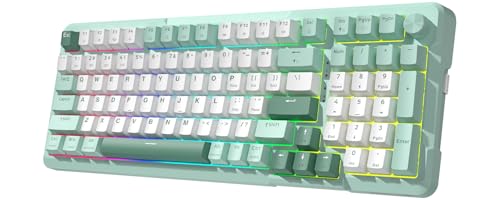
3. Redragon K742 Wireless Mechanical Gaming Keyboard with Knob
Rating: 9.0/10
The Redragon K742 is a versatile wireless mechanical keyboard that offers a premium typing and gaming experience. Its creamy, quiet switches and customizable features make it a great addition to any desk, whether you’re working or playing.
What We Like:
- The gasket structure and sound-absorbing padding create a silent and satisfying typing feel.
- Pre-lubed RPC Linear Switches deliver a smooth, creamy keystroke.
- Tri-mode connectivity (Bluetooth, 2.4GHz, USB-C) lets you connect up to 3 devices easily.
- Hot-swappable PCB allows for easy switch and keycap changes.
- QMK/VIA support offers deep customization for key mapping and macros.
- The 98% compact layout saves desk space, and the multimedia knob is super handy.
- Long battery life keeps you powered up for hours.
What Could Be Improved:
- The JSON file for VIA/QMK customization needs to be requested separately.
- While the switches are described as linear, some users might prefer tactile or clicky options.
This keyboard is a fantastic option for anyone looking for a customizable, comfortable, and efficient typing tool that can also handle gaming. It’s a solid choice for both productivity and play.
4. Redragon K668 RGB Gaming Keyboard

Rating: 8.6/10
Get ready to level up your game and your workspace with the Redragon K668 RGB Gaming Keyboard. This keyboard isn’t just about looks; it’s packed with features to make your typing and gaming experience awesome. With its cool RGB lighting, comfy design, and customizable options, it’s a solid choice for gamers and anyone who spends a lot of time on their computer.
What We Like:
- You can easily swap out the red mechanical switches for different ones if you want.
- The keyboard comes with two sets of colorful keycaps, letting you personalize its look.
- It has a full-size layout with 108 keys, including extra shortcut keys for convenience.
- The RGB lighting offers many cool effects, including a music sync mode that makes your desk light up.
- Built-in foam helps make the typing sound clear and satisfying, not annoying.
- The keyboard has adjustable feet for a more comfortable typing position.
- You can use software to create custom lighting effects and macros for gaming or work.
What Could Be Improved:
- The included red switches are quiet and linear, which some users might find too light.
- While it supports many switch types, it’s still a wired keyboard.
The Redragon K668 RGB Gaming Keyboard offers a fantastic blend of customization, performance, and style for its price. It’s a great way to add some flair and functionality to your setup.
5. Cherry KC 200 MX Mechanical Office Keyboard with New MX2A switches. Modern Design with Metal Plate Frame. (Bronze W/MX2A Silent Red Switch)

Rating: 8.7/10
The Cherry KC 200 MX Mechanical Office Keyboard with New MX2A switches and a modern bronze metal plate frame offers a sophisticated upgrade for your workspace. This keyboard, featuring the new MX2A Silent Red switches, is designed for quiet, efficient typing, making it ideal for office environments.
What We Like:
- The new CHERRY MX2A switches provide a smoother and more satisfying typing experience.
- These switches offer improved acoustics, meaning a more pleasant sound when you type.
- The MX2A Silent Red switches are perfect for quiet offices and can handle 50 million keystrokes.
- The keyboard has a modern design with a sturdy metal plate frame for durability.
- It features built-in White LED indicators for CAPS, SCROLL, and NUM lock, which are easy to see.
- The Gold-Crosspoint contact precision ensures reliable input every time.
What Could Be Improved:
- The description focuses heavily on Silent Red switches; other switch options might have different pros and cons not detailed here.
- While 50 million keystrokes is good, some users might prefer the 100 million keystroke guarantee of the Brown switches for longer-term use.
This keyboard offers a premium typing feel and a sleek look. It’s a solid choice for anyone seeking a quiet, reliable, and stylish mechanical keyboard for their office.
Finding Your Silent Sanctuary: A Guide to Quiet Mechanical Keyboards
Are you tired of the loud clack-clack-clack of your keyboard interrupting your focus or annoying your roommates? You’re not alone! Many people love the feel of mechanical keyboards but dislike the noise. Luckily, there’s a solution: quiet mechanical keyboards. This guide will help you find the perfect silent typing companion.
Why Choose a Quiet Mechanical Keyboard?
Mechanical keyboards feel great to type on. They offer a satisfying tactile bump or a smooth press, making typing more enjoyable and often more accurate. Quiet mechanical keyboards take this experience and remove the loud noise. This makes them ideal for shared spaces like offices, libraries, dorm rooms, or even just quiet homes.
1. Key Features to Look For
When choosing a quiet mechanical keyboard, several features matter.
Key Switches: The Heart of the Keyboard
- Silent Switches: This is the most important feature. Look for switches specifically designed to be quiet. Brands like Cherry MX have “Silent Red” or “Silent Black” switches. Gateron and Kailh also offer silent versions of their popular switches. These switches have dampening materials inside to reduce the noise when the key bottoms out.
- Tactile vs. Linear:
- Tactile: These switches have a small bump you feel when the key is pressed. Some silent tactile switches exist, but they might still make a slight sound.
- Linear: These switches have a smooth, consistent press all the way down. Silent linear switches are generally the quietest option. They don’t have a bump.
- Actuation Force: This is how much pressure you need to press a key. Lighter switches (around 45g) are easier to press and can lead to less force applied when you bottom out, potentially reducing noise.
Build Quality and Design
- Frame Material: A sturdy frame can reduce vibrations. Metal frames, like aluminum, are excellent for this. Plastic frames can be good too, but a thicker, well-built plastic is better.
- Keycaps: The material and thickness of keycaps affect sound.
- PBT Keycaps: These are durable and have a textured feel. They often produce a deeper, less “pingy” sound than ABS keycaps.
- ABS Keycaps: These are common and cheaper. They can feel smoother but might sound higher-pitched or hollower. Thicker ABS keycaps are better than thin ones.
- Sound Dampening: Some keyboards have built-in foam or other materials to absorb sound. This is a big plus for quiet operation.
Connectivity and Extras
- Wired vs. Wireless: Wireless offers more desk freedom. Ensure the wireless connection is stable and low-latency.
- Backlighting: Some quiet keyboards have backlighting. This can be useful in dim environments. RGB lighting is a fun aesthetic choice.
- Layout: Consider the size and layout (full-size, tenkeyless, compact). A smaller keyboard might be quieter overall because it has fewer keys.
2. Important Materials
The materials used in your keyboard significantly impact its sound and feel.
- Switch Housings: Made of plastic, these hold the internal components. The type of plastic and design affect noise.
- Springs: These provide the resistance for the key press. Different spring weights affect the feel and how hard you bottom out.
- Keycaps: As mentioned, PBT plastic is generally preferred for its sound and durability. Thicker keycaps absorb more sound.
- Plate: This is the layer beneath the key switches. Metal plates (like aluminum or steel) are sturdy. Polycarbonate or FR4 plates can offer a softer typing feel and a deeper sound.
- Case: The outer shell of the keyboard. Aluminum cases are premium and help dampen vibrations. High-quality ABS plastic cases are also common and effective.
3. Factors That Improve or Reduce Quality
Several things make a quiet mechanical keyboard great or not so great.
Improving Quality:
- High-Quality Silent Switches: The core of a quiet keyboard.
- Thick, PBT Keycaps: They contribute to a deeper, less resonant sound.
- Solid Case Construction: A robust case minimizes flex and vibration.
- Internal Sound Dampening Foam: This is a significant upgrade for reducing hollowness and echo.
- Well-Lubricated Switches and Stabilizers: This reduces friction and prevents rattling sounds.
Reducing Quality:
- Thin, Cheap ABS Keycaps: These can sound hollow and pingy.
- Wobbly or Flimsy Case: This allows vibrations to travel and amplify.
- No Sound Dampening: This can lead to an echoey or hollow typing sound.
- Poorly Made or Non-Silent Switches: These will defeat the purpose of a quiet keyboard.
- Rattling Stabilizers: This is a common annoyance that makes even good switches sound bad.
4. User Experience and Use Cases
A quiet mechanical keyboard offers a fantastic user experience in many situations.
- For Students: Typing essays or coding in a dorm room or library without disturbing others.
- For Office Workers: Maintaining focus and professionalism in an open-plan office. No more distracting clicks!
- For Content Creators: Recording voiceovers or streaming without keyboard noise interfering with audio.
- For Gamers: Enjoying the precision of mechanical switches without the loud sound that might break immersion or annoy teammates.
- For Home Use: Peaceful typing for everyday tasks, browsing, or writing at home.
A quiet mechanical keyboard lets you enjoy the benefits of mechanical typing without the drawbacks of noise. It’s a smart investment for anyone who values a calm and productive environment.
Frequently Asked Questions (FAQ)
Q: What makes a mechanical keyboard quiet?
A: Silent mechanical switches are the main reason. These switches have special padding inside to stop the loud noise when you press the keys all the way down.
Q: Are all silent mechanical keyboards the same?
A: No, they are not. Different brands use different types of silent switches. The materials used for the keycaps and the keyboard’s case also affect how quiet it is.
Q: What is the quietest type of silent switch?
A: Silent linear switches are usually the quietest. They have a smooth press all the way down and no noticeable bump, which helps reduce noise.
Q: Can I make my current mechanical keyboard quieter?
A: Yes, you can. You can buy silent key switches and swap them out. Adding foam inside the keyboard case also helps reduce noise.
Q: Are silent mechanical keyboards good for gaming?
A: Yes, they are. Gamers can still get the fast response and good feel of mechanical switches without the loud noise. This is good for online games and streaming.
Q: What does “tactile” mean for a keyboard switch?
A: A tactile switch has a small bump you can feel when you press the key. This bump tells you when the key has been registered. Silent tactile switches exist, but they might still make a small sound.
Q: What are PBT keycaps, and why are they good for quiet keyboards?
A: PBT keycaps are made of a strong plastic that feels a bit rough. They are thicker than regular ABS keycaps and make a deeper sound, which is less noisy.
Q: Do wireless quiet mechanical keyboards exist?
A: Yes, many quiet mechanical keyboards come in wireless versions. This gives you more freedom to place your keyboard on your desk.
Q: How much do quiet mechanical keyboards usually cost?
A: The price can vary a lot. Simple quiet keyboards might start around $50, while high-end ones with premium features can cost $150 or more.
Q: Will a quiet mechanical keyboard be completely silent?
A: No, they are not completely silent. They are designed to be much quieter than regular mechanical keyboards. You will still hear a soft sound when you type.
In conclusion, every product has unique features and benefits. We hope this review helps you decide if it meets your needs. An informed choice ensures the best experience.
If you have any questions or feedback, please share them in the comments. Your input helps everyone. Thank you for reading.

My name is Gary Flores, the creator of deepskyblue-owl-132507.hostingersite.com.. With a passion for creating cozy, functional, and beautiful spaces, I share my personal experiences and expertise about everything related to home improvement. From practical tips to design inspiration, my goal is to help you make your home the best it can be.