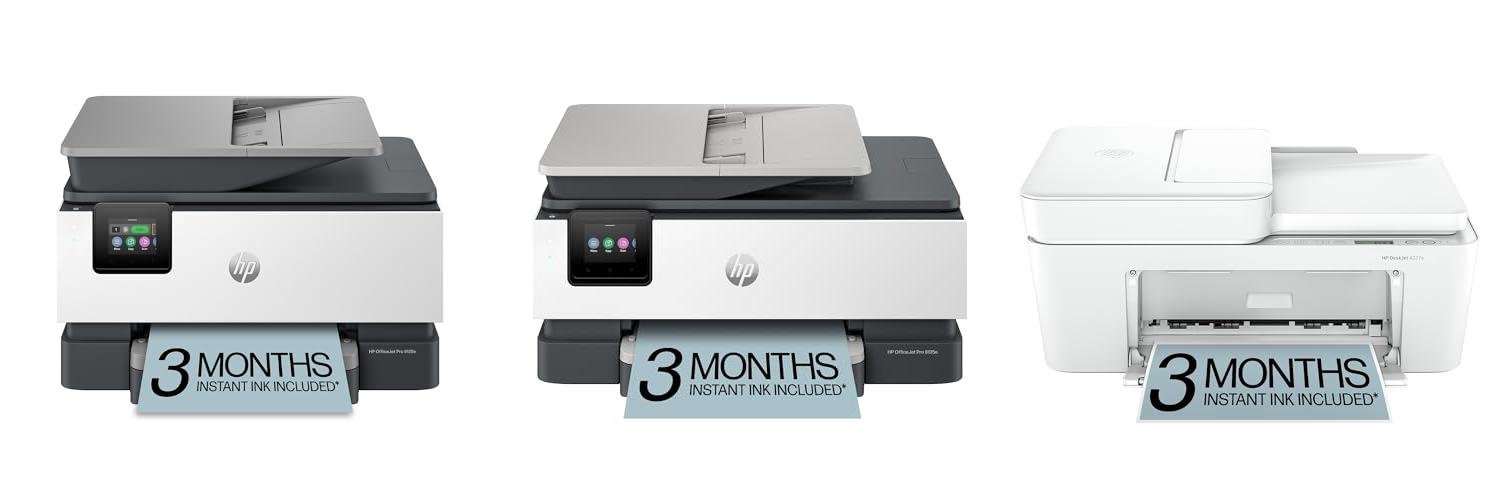
Imagine this: you’re in the middle of an important project, and you need to print, scan, or copy something urgently. But your old printer just isn’t cutting it. Maybe it jams all the time, or the ink runs out too quickly. Or perhaps you’re trying to scan a document, and the quality is so bad you can barely read it. It’s frustrating, right?
Choosing a new home office printer, scanner, and copier (often called an all-in-one) can feel like a big decision. There are so many different kinds, with all sorts of features and prices. It’s easy to get overwhelmed and wonder which one will actually make your work life easier instead of harder. You want something reliable that won’t break the bank.
Don’t worry! This guide is here to help. We’ll break down what makes a good all-in-one printer and show you how to pick the perfect one for your needs. By the end, you’ll feel confident about your choice and ready to get back to your work without any printing headaches.
Our Top 5 Home Office Printer Scanner Copier Recommendations at a Glance
Top 5 Home Office Printer Scanner Copier Detailed Reviews
1. HP OfficeJet Pro 9125e Wireless All-in-One Color Inkjet Printer

Rating: 9.0/10
The HP OfficeJet Pro 9125e is a powerful all-in-one printer designed for busy offices. It prints, scans, copies, and faxes, making it a versatile tool for your workday. This printer also boasts cool AI features that help make your printing perfect.
What We Like:
- It prints professional-looking color documents like presentations and flyers.
- HP AI helps print web pages and emails correctly, so you don’t waste paper.
- It prints fast, up to 22 pages per minute in black and 18 pages per minute in color.
- It has upgraded features like auto 2-sided printing and scanning, plus an automatic document feeder.
- The dual-band Wi-Fi is very reliable and fixes connection problems on its own.
- You can print, scan, copy, or fax from your phone, computer, or tablet using the easy HP app.
- You get 3 months of free Instant Ink, so you don’t have to worry about running out of ink.
- Built-in HP Wolf Pro Security helps protect your printer and network from online threats.
- The 2.7-inch touchscreen is large and easy to use, just like your smartphone.
- It’s made with over 40% recycled plastic, which is good for the environment.
What Could Be Improved:
- The printer only works with HP ink cartridges.
- Firmware updates will happen automatically to keep the security working.
This printer is a smart choice for any office needing reliable and high-quality printing. It offers many features to make your work easier and more efficient.
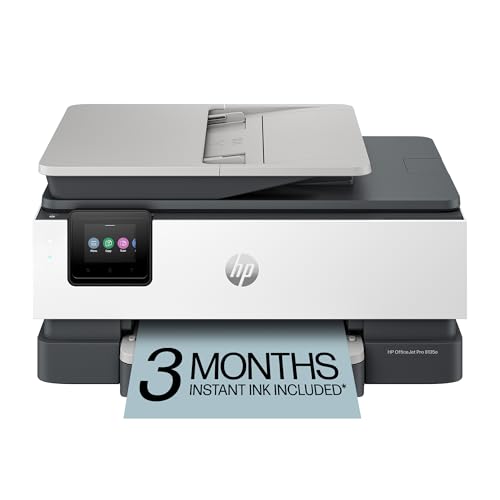
2. HP OfficeJet Pro 8135e Wireless All-in-One Color Inkjet Printer
Rating: 8.7/10
The HP OfficeJet Pro 8135e is a fantastic all-in-one printer designed for your home office. It handles printing, scanning, copying, and faxing with ease, making it a true workhorse for your business needs. Plus, it comes with a 3-month Instant Ink trial to get you started.
What We Like:
- Prints professional-quality color documents like reports and flyers.
- HP AI technology ensures perfectly formatted prints, saving paper.
- Fast color printing speeds up to 10 ppm and black and white up to 20 ppm.
- Includes auto-duplex printing and an auto document feeder for efficiency.
- Reliable dual-band Wi-Fi automatically fixes connection problems.
- The HP app lets you print, scan, copy, and fax from your phone or tablet.
- HP Wolf Essential Security protects your data and network.
- Easy to use with a 2.7-inch color touchscreen.
- Made with over 45% recycled plastic, showing a commitment to sustainability.
What Could Be Improved:
- The printer is designed to work only with HP cartridges.
- Firmware updates will block non-HP cartridges.
This printer offers a great blend of features and convenience for any home office. It’s a smart choice for anyone needing a reliable and feature-rich printing solution.
3. HP DeskJet 4227e Wireless All-in-One Color Inkjet Printer

Rating: 8.6/10
Meet the HP DeskJet 4227e, your new go-to for all your home printing needs. This little powerhouse handles everything from to-do lists and letters to recipes and financial papers. It’s a scanner and copier too, making it a true all-in-one solution for busy households.
What We Like:
- HP AI makes printing web pages and emails a breeze. It smartly formats your documents so you don’t waste paper.
- It prints in color and black and white, and can copy and scan.
- The auto document feeder is handy for scanning multiple pages.
- Wireless printing is super reliable, and it fixes connection problems on its own.
- The HP app lets you print, scan, and copy from your phone or tablet.
- You get a 3-month trial of HP Instant Ink, so ink gets delivered right to your door.
- It has a compact design that fits easily in any room.
- The ICON LCD screen makes it simple to print basic documents.
- It’s made with recycled plastic and is good for the environment.
What Could Be Improved:
- Print speeds are a bit slow, especially for color printing (5.5 ppm color, 8.5 ppm black).
- The printer only works with HP ink cartridges.
The HP DeskJet 4227e is a solid choice for home users who need an easy-to-use, all-in-one printer. Its smart features and convenience make everyday printing tasks much simpler.
4. HP Smart Tank Plus 651 Wireless All-in-One Printer

Rating: 9.1/10
Meet the HP Smart Tank Plus 651 Wireless All-in-One Printer, your go-to for printing lots of colorful pages at home. This printer is from HP, a brand many people trust. It’s designed for families who print a lot, and it comes with enough ink to last for up to two years!
What We Like:
- Huge Ink Savings: You get up to 8,000 color pages or 6,000 black pages right from the start. That means you won’t have to buy ink for a long time, saving you money.
- All-in-One Power: This printer can print, copy, scan, and even fax. It makes handling all your paper tasks super easy.
- Automatic Document Feeder: The 35-page auto document feeder lets you scan or copy multiple pages quickly without you having to feed them one by one.
- Wireless Convenience: Print from your phone or computer without any messy wires. The Wi-Fi connection is reliable and makes printing simple.
- Great Print Quality: Your photos will look amazing, and your documents will have sharp, clear text. HP printers deliver bright, true-to-life colors.
- Easy Setup: Getting this printer up and running is a breeze. The HP app also helps you print and scan easily.
- Fast Printing: It prints up to 11 pages per minute in black and 5 pages per minute in color, so you won’t wait long for your prints.
What Could Be Improved:
- Speed for High-Volume Color: While it’s good for home use, the color printing speed might be a bit slow if you need to print hundreds of color pages very quickly.
- Initial Ink Cost (Bundled): Although the ink is a huge saving over time, the initial purchase price might reflect the large amount of included ink.
This HP Smart Tank Plus 651 printer offers fantastic value and convenience for busy households. It’s a smart choice for anyone looking to save money on printing and enjoy high-quality results.
5. HP DeskJet 4255e Wireless All-in-One Color Inkjet Printer

Rating: 9.3/10
Meet the HP DeskJet 4255e, your new best friend for all your home printing needs. This all-in-one machine handles printing, scanning, and copying with ease. It’s a great fit for busy households printing everything from homework to grocery lists.
What We Like:
- HP AI Printing: This smart feature makes sure your web pages and emails print perfectly, saving you paper and frustration.
- Easy Wireless Connection: The printer automatically finds and fixes Wi-Fi problems, keeping you connected without hassle.
- HP App Control: Print, scan, and copy right from your phone or tablet. It’s super simple to use.
- 3 Months of Instant Ink: Get free ink delivered to your door for three months with HP+ activation.
- Compact and Eco-Friendly: It fits anywhere and is made with recycled plastic, plus it’s ENERGY STAR certified.
- Built-in Document Feeder: The auto document feeder makes scanning and copying multiple pages a breeze.
What Could Be Improved:
- Print Speed: While good for home use, the print speeds (5.5 ppm color, 8.5 ppm black) might be slow for very high-volume printing needs.
- HP Cartridge Restriction: The printer only works with HP cartridges that have an HP chip. You can’t use cartridges from other brands.
The HP DeskJet 4255e is a smart and convenient printer for any home. Its AI features and easy app control make printing simple and efficient.
Your Guide to the Perfect Home Office Printer Scanner Copier
Setting up a home office means you need reliable tools. One of the most important is a printer scanner copier. This all-in-one machine saves space and makes tasks easier. Let’s find the best one for you.
What to Look for: Key Features
When you shop, keep these important features in mind.
- All-in-One Functionality: Make sure it prints, scans, and copies. This saves you from buying separate machines.
- Print Speed: How fast does it print? Look for pages per minute (ppm). Faster speeds help you finish work quickly.
- Print Quality: This is about how clear your documents look. For text, look for high resolution (dots per inch or DPI). For photos, you need good color accuracy.
- Scanner Resolution: A higher DPI means a clearer scanned image. This is important for detailed documents or photos.
- Connectivity: How does it connect to your computer? Wi-Fi is very convenient. USB is also a common option. Some printers let you print from your phone or tablet.
- Automatic Document Feeder (ADF): An ADF lets you scan or copy multiple pages at once. This saves a lot of time.
- Duplex Printing: This feature prints on both sides of the paper automatically. It saves paper and makes your documents look more professional.
- Ink or Toner Type: Inkjet printers use liquid ink. Laser printers use toner powder. Inkjets are good for photos. Laser printers are usually better for lots of text and are often cheaper to run.
Materials That Matter
The materials used can affect how well your printer works and how long it lasts.
- Build Quality: A sturdy plastic body usually means the printer is built to last.
- Print Head (Inkjet): A good print head creates sharp, clear lines.
- Drum Unit (Laser): The drum is key to toner transfer. A quality drum ensures good print quality over time.
What Makes a Printer Great (or Not So Great)
Several things can make your printer experience better or worse.
- Factors That Improve Quality:
- High DPI for printing and scanning means sharper images.
- Good ink or toner cartridges produce vibrant colors and deep blacks.
- Reliable connectivity ensures smooth printing without interruptions.
- User-friendly software makes setup and operation simple.
- Factors That Reduce Quality:
- Low DPI can result in blurry text or images.
- Cheap ink or toner can fade or look washed out.
- Slow or unreliable Wi-Fi can cause printing delays.
- Complex menus and difficult setup frustrate users.
Your Experience and How You’ll Use It
Think about how you plan to use your printer scanner copier.
- For Basic Home Office Use: If you mostly print documents and scan occasional papers, a simple inkjet or a compact laser printer will work well.
- For Creative Work or Photos: If you print photos or graphics, look for an inkjet printer with good color reproduction and high DPI.
- For High Volume Printing: If you print a lot of pages, a laser printer is often more cost-effective and faster. An ADF is a big help here.
- For Small Spaces: Compact models are available if you don’t have much desk space.
Frequently Asked Questions
Q: What is the most important feature for a home office printer?
A: The most important feature is that it reliably prints, scans, and copies. After that, print speed and quality are very important.
Q: Should I get an inkjet or a laser printer?
A: Inkjets are great for photos and color. Lasers are usually better for lots of text and can be cheaper to run.
Q: What does DPI mean?
A: DPI stands for Dots Per Inch. It tells you how sharp your printed or scanned images will be. Higher DPI means better quality.
Q: Is Wi-Fi connectivity really useful?
A: Yes, Wi-Fi is very useful. It lets you print from anywhere in your home without cables.
Q: What is an ADF and why do I need it?
A: An ADF is an Automatic Document Feeder. It lets you scan or copy many pages at once. This saves you time.
Q: How can I save money on ink or toner?
A: Buy printers that use less ink or toner. Look for models with high-yield cartridges. Sometimes, laser printers are cheaper to run for lots of printing.
Q: Can I print from my phone?
A: Many modern printers let you print directly from your smartphone or tablet. Look for models that support mobile printing apps.
Q: How do I know if a printer will last a long time?
A: Look for good build quality. Read reviews from other users about how long their printers have lasted.
Q: What if I only print occasionally?
A: If you don’t print much, a basic inkjet printer might be fine. Just be aware that ink can dry out if not used regularly.
Q: Where can I find reviews for specific printers?
A: You can find reviews on tech websites, online stores like Amazon, and YouTube. Reading many reviews helps you make a good choice.
In conclusion, every product has unique features and benefits. We hope this review helps you decide if it meets your needs. An informed choice ensures the best experience.
If you have any questions or feedback, please share them in the comments. Your input helps everyone. Thank you for reading.

My name is Gary Flores, the creator of deepskyblue-owl-132507.hostingersite.com.. With a passion for creating cozy, functional, and beautiful spaces, I share my personal experiences and expertise about everything related to home improvement. From practical tips to design inspiration, my goal is to help you make your home the best it can be.