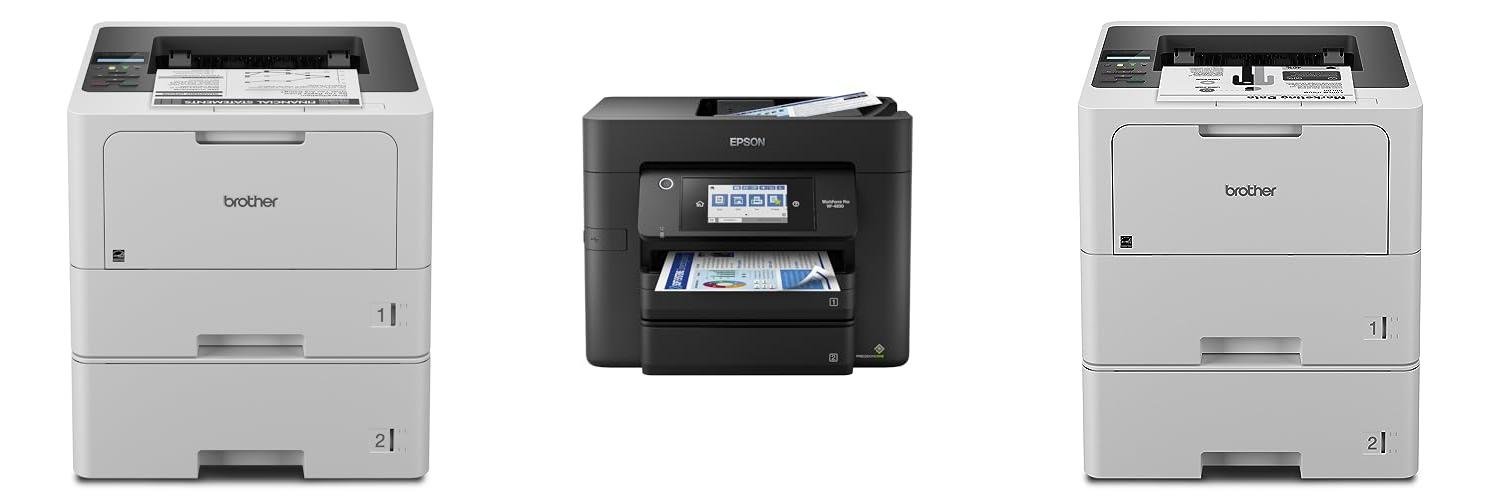
Ever feel like your printer is always begging for more paper? You’re printing a report, and suddenly, a “paper out” message pops up. Frustrating, right? This happens a lot when you have a lot to print. That’s where printers with two paper trays come in handy.
Choosing the right printer with two paper trays can be tricky. There are so many to pick from, and they all seem to do different things. You want one that’s easy to use, prints well, and doesn’t cost too much. But figuring out which one is best for your needs can feel like a puzzle.
This blog post will make it easy! We’ll break down what to look for in a printer with two paper trays. You’ll learn how they can save you time and hassle. By the end, you’ll know exactly which printer is the perfect fit for your home or office. Let’s dive in and find your ideal printing buddy!
Our Top 5 Printer With Two Paper Trays Recommendations at a Glance
Top 5 Printer With Two Paper Trays Detailed Reviews
1. Brother HL-L5210DWT Business Monochrome Laser Printer with Dual Trays

Rating: 8.9/10
The Brother HL-L5210DWT Business Monochrome Laser Printer is a powerhouse designed to keep your office running smoothly. It prints quickly, holds a lot of paper, and connects easily to your network. This printer is built for busy workplaces that need reliable and efficient document production.
What We Like:
- Super fast printing at up to 48 pages per minute to get your work done quickly.
- Two large paper trays (250 sheets and 520 sheets) plus a multipurpose tray mean fewer interruptions for refilling.
- Optional extra trays can expand the paper capacity even more, up to 1,390 sheets.
- Uses super high-yield toner cartridges that print up to 11,000 pages, saving you money in the long run.
- Connects easily with Gigabit Ethernet and dual-band wireless, so everyone can share it.
- You can print from your phone or tablet, making it super convenient.
- Strong security features protect your network and documents.
What Could Be Improved:
- This is a monochrome (black and white) printer, so it can’t print in color.
- The initial toner cartridge is a starter size (3,000 pages), so you might need to replace it sooner than the super high-yield option.
For offices that need speed, capacity, and cost savings, the Brother HL-L5210DWT is a fantastic choice. It’s a reliable workhorse that helps boost productivity.
2. Epson Workforce Pro WF-4830 Wireless All-in-One Printer with Auto 2-Sided Print

Rating: 9.1/10
The Epson Workforce Pro WF-4830 is a powerful wireless all-in-one printer designed to handle busy home or small office needs. It prints, copies, scans, and faxes, all while offering automatic two-sided printing to save paper. With its large paper capacity and speedy printing technology, it’s built to keep up with your workload.
What We Like:
- Fast printing speeds mean less waiting for your documents.
- It prints really high-quality, professional-looking papers.
- The printer is made to be reliable, so it won’t break down easily, even with lots of printing.
- It can do automatic two-sided printing, copying, scanning, and faxing, which is super convenient.
- The large 500-sheet paper capacity means you won’t have to refill paper as often.
- The 4.3-inch color touchscreen makes it easy to find what you need and control the printer.
- Setting up wireless printing is simple, even using your phone with Bluetooth.
- Scanning is a breeze with the easy-to-use Epson ScanSmart software.
- It works with Alexa, so you can control it with your voice.
What Could Be Improved:
- This printer is designed to only work with genuine Epson ink cartridges.
The Epson Workforce Pro WF-4830 is a solid choice for anyone needing a reliable and feature-rich printer. It makes everyday tasks much easier.
3. Brother HL-L6210DWT Business Monochrome Laser Printer with Dual Paper Trays

Rating: 8.7/10
The Brother HL-L6210DWT Business Monochrome Laser Printer is designed to handle busy office needs with speed and efficiency. Its white, sleek design fits into any workspace, and it offers advanced features to keep your printing smooth and secure.
What We Like:
- Dual Paper Trays: Two large 520-sheet trays mean you won’t be constantly refilling paper. There’s also a 100-sheet multipurpose tray for special paper or envelopes. The total paper capacity can even grow with an optional tray.
- Low-Cost Output: Save money with the ultra high-yield toner cartridge that prints up to 18,000 pages. It comes with a 3,000-page starter cartridge, so you can start printing right away.
- Flexible Connectivity: Connect easily with Gigabit Ethernet for wired networks or dual-band wireless for Wi-Fi. You can also print from your phone or tablet.
- Advanced Security: Triple Layer Security helps keep your network, devices, and printed documents safe.
- Fast Printing: Print up to 50 pages per minute, making it perfect for getting lots of high-quality documents printed quickly.
What Could Be Improved:
- This model is monochrome only, meaning it only prints in black and white.
The Brother HL-L6210DWT is a powerful and cost-effective choice for offices that need reliable, fast monochrome printing. Its large paper capacity and advanced security features make it a smart investment for productivity.
4. Brother INKvestment 4555 Wireless Color Inkjet All-in-One Printer with 2.7” Color Touchscreen and 2 Paper Trays

Rating: 8.8/10
The Brother INKvestment 4555 Wireless Color Inkjet All-in-One Printer is a powerful tool for small offices and businesses. It handles printing, copying, scanning, and faxing with ease, all in one compact machine. You get a good amount of ink to start, with a black cartridge that prints up to 1,800 pages and color cartridges for about 750 pages each.
What We Like:
- It’s a true all-in-one, saving space and simplifying tasks.
- You can connect it in several ways: Ethernet, Wi-Fi, or USB. Wi-Fi Direct lets you print wirelessly even without a router.
- The 2.7” color touchscreen makes it easy to navigate and use.
- It connects to cloud apps like Google Drive and Dropbox, so you can print from or scan to them easily.
- Automatic 2-sided printing saves paper.
- It has a large paper capacity of 400 sheets spread across two trays.
- The 20-page automatic document feeder speeds up scanning and copying multi-page documents.
- Print speeds are good, with up to 20 pages per minute in black and 19 pages per minute in color.
- The Brother Mobile Connect app lets you control the printer from your phone or tablet.
- Using Brother Genuine LC506 ink ensures reliable performance.
What Could Be Improved:
- The included ink cartridges, while generous, will eventually need replacing.
- The Refresh Subscription Trial might not be for everyone; some users prefer to buy ink as needed.
This printer is a solid choice for busy small offices that need a dependable and versatile machine. Its many features help boost productivity and make everyday tasks simpler.
5. Brother MFC-J4535DW INKvestment -Tank All-in-One Color Inkjet Printer with NFC

Rating: 9.2/10
Meet the Brother MFC-J4535DW INKvestment-Tank printer, your new best friend for all your printing needs. This all-in-one machine prints in color, connects wirelessly, and even has NFC for easy phone printing. It comes with enough ink to last you a whole year, which is a huge money saver!
What We Like:
- Up to 1-Year of Ink in-Box: You get a full year’s worth of ink right out of the box. This means fewer trips to the store and more money in your pocket.
- Revolutionary INKvestment Tank System: No more messy ink refills. The special ink tank system keeps ink flowing smoothly.
- Versatile Connection Options: Connect in lots of ways! It has dual-band wireless, Wi-Fi Direct, Ethernet, USB, and NFC for super easy phone printing.
- Large 400-Sheet Paper Capacity: Load paper less often. The big 400-sheet tray is perfect for big printing jobs.
- Easy Mobile & Cloud Management: Use the Brother Mobile Connect App to print and scan from anywhere. It makes managing your printer simple.
- Smart Ink Management with Alexa: Your printer works with Alexa. Get alerts when ink is low and even set up automatic reordering.
What Could Be Improved:
- The initial setup might take a little time.
- While it’s great for everyday use, professional photo printing might require a different machine.
The Brother MFC-J4535DW is a fantastic choice for homes and small offices looking for an affordable and convenient printing solution. Its long-lasting ink and smart features make it a winner.
The Ultimate Buying Guide: Printers with Two Paper Trays
Are you tired of constantly swapping out paper in your printer? Do you need to print on different sizes or types of paper regularly? A printer with two paper trays might be the perfect solution for you! This guide will help you find the best printer to meet your needs.
Why Two Paper Trays?
Having two paper trays offers amazing convenience. You can load one tray with plain paper for everyday printing and the other with letterhead or photo paper. This saves you time and prevents mistakes. Some printers even let you set default paper types for different print jobs.
Key Features to Look For
Paper Capacity
Check how many sheets each tray can hold. More sheets mean you refill less often. Some printers have a main tray and a smaller multipurpose tray. Others have two equally sized trays.
Paper Sizes and Types
Make sure the printer can handle the paper sizes you use most. Common sizes include letter, legal, and A4. Also, see if it prints on different paper types like cardstock or envelopes.
Print Speed
How fast do you need your documents? Print speed is measured in pages per minute (PPM). For busy offices, a faster PPM is a big plus.
Print Quality
Look at the resolution, measured in dots per inch (DPI). Higher DPI means sharper text and clearer images. For professional documents or photos, high DPI is important.
Connectivity Options
How will you connect the printer? Wi-Fi is great for wireless printing from any device. USB is a standard wired connection. Ethernet is good for network sharing.
All-in-One Capabilities
Do you need to scan and copy too? Many printers with two trays are also all-in-one devices. This saves space and money.
Important Materials and Build Quality
Durable Construction
Printers are an investment. Look for a sturdy build. Metal components often mean a more durable printer than one made only of plastic.
Paper Tray Design
The trays themselves should feel solid. They should slide in and out smoothly. Some trays are adjustable for different paper sizes, which is a helpful feature.
Factors That Improve or Reduce Quality
Ink or Toner Cartridges
For inkjet printers, the quality of the ink matters. Pigment-based inks are better for longevity and water resistance than dye-based inks. For laser printers, toner quality affects print sharpness.
Print Head Technology (Inkjet)
Better print heads can produce finer details and more accurate colors.
Drum Unit (Laser)
A good drum unit in a laser printer ensures crisp, clear toner transfer to the paper.
Driver Software
Reliable and up-to-date driver software helps the printer perform at its best. Poor software can lead to printing errors or lower quality.
User Experience and Use Cases
Home Office Heroes
If you work from home, two trays are a lifesaver. Print invoices on plain paper and reports on letterhead without stopping. This keeps your workflow smooth.
Small Business Boosters
Small businesses often need to print various materials. You can keep one tray stocked with invoices and the other with marketing flyers. This saves precious time during busy periods.
Creative Corner Companions
For crafters or photography enthusiasts, one tray can hold photo paper while the other holds cardstock for projects. This makes printing your creations easy.
Everyday Convenience
Even for simple home use, having two trays means you can load a larger stack of plain paper and a smaller stack of envelopes. Less refilling means more time for what matters.
Frequently Asked Questions (FAQ)
Q: What are the main benefits of a printer with two paper trays?
A: The main benefits are convenience and efficiency. You can print on different paper types or sizes without constantly swapping paper. This saves time and reduces errors.
Q: Can I use different paper sizes in each tray?
A: Most printers with two trays allow you to set different paper sizes for each tray. Always check the printer’s specifications to be sure.
Q: Are printers with two trays more expensive?
A: They can sometimes be slightly more expensive than single-tray models, but the added convenience often makes them worth the extra cost.
Q: What is PPM?
A: PPM stands for Pages Per Minute. It tells you how many pages the printer can print in one minute.
Q: What is DPI?
A: DPI stands for Dots Per Inch. It measures print resolution. Higher DPI means sharper prints.
Q: Do all two-tray printers have Wi-Fi?
A: No, not all of them do. Wi-Fi is a common feature, but you should check the product details to confirm.
Q: Can I print on envelopes with a two-tray printer?
A: Many two-tray printers can handle envelopes, especially if one tray is a multipurpose tray designed for different media types.
Q: How often should I refill the paper trays?
A: This depends on the capacity of each tray and how much you print. Larger capacity trays mean less frequent refilling.
Q: Are there any downsides to having two paper trays?
A: The main potential downside is that the printer might be slightly larger to accommodate the extra tray.
Q: Where can I find the specifications for a printer?
A: Printer specifications are usually listed on the product packaging, in the user manual, and on the manufacturer’s website.
In conclusion, every product has unique features and benefits. We hope this review helps you decide if it meets your needs. An informed choice ensures the best experience.
If you have any questions or feedback, please share them in the comments. Your input helps everyone. Thank you for reading.

My name is Gary Flores, the creator of deepskyblue-owl-132507.hostingersite.com.. With a passion for creating cozy, functional, and beautiful spaces, I share my personal experiences and expertise about everything related to home improvement. From practical tips to design inspiration, my goal is to help you make your home the best it can be.